
3.5 KiB
Charcoal Outline
A clean, dark Fluxer theme with a solid charcoal background, transparent main panels, blue feature accents, and thin gray hover outlines.
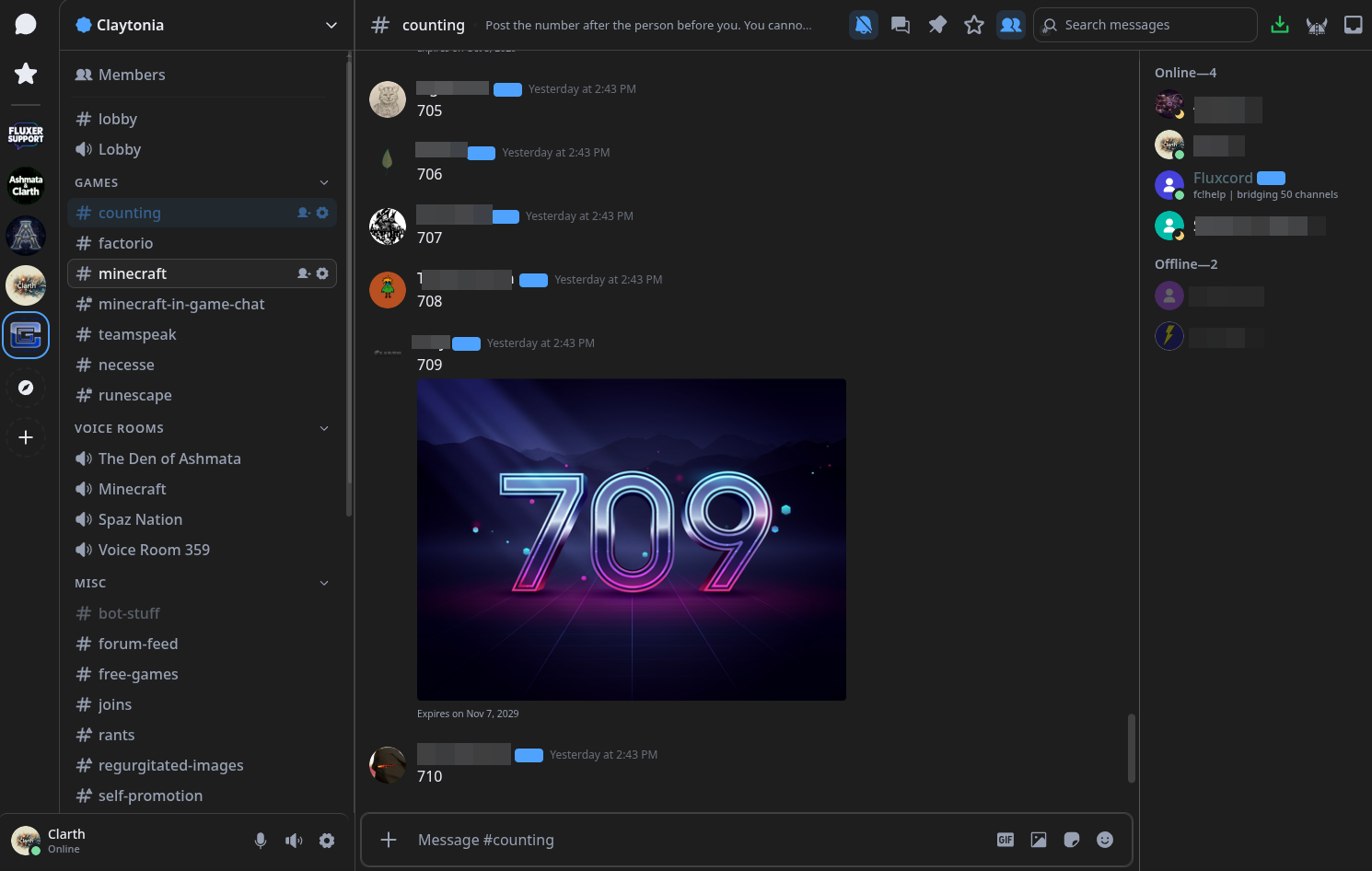
Features
- Solid charcoal background (
#1e1e1e). - Transparent main panels with subtle gray borders.
- Thin gray hover outlines on targeted controls and selectable rows.
- Blue accents for primary actions and selected states.
- Distinct danger, warning, success, and presence colors.
- Opaque menus, tooltips, and popouts for readability.
- System fonts with no external assets or network dependencies.
- No custom JavaScript, gradients, glow, or animations.
Installation
- Download
Charcoal Outline.cssfrom this repository. - Open Fluxer's theme settings and add the stylesheet using the CSS import or editor option available in your client.
- Enable Charcoal Outline.
This is a complete replacement stylesheet, not an append-only patch. If you used an earlier version, replace its CSS rather than appending this version.
The exact theme-management controls may vary by client version.
Customization
The palette is defined in the :root, body block near the top of the stylesheet:
--co-background: #1e1e1e;
--co-text: #e8ebf2;
--co-muted: #98a1b3;
--co-accent: #4fa3ff;
--co-danger: #ef6565;
--co-success: #7bdca2;
--co-warning: #f2ce75;
--co-line: rgba(128,128,128,.35);
--co-code: rgba(128,128,128,.2);
--co-hover: rgba(128,128,128,.08);
--co-selected: rgba(79,163,255,.14);
--co-linecontrols panel borders and gray hover outlines.--co-accentcontrols mapped blue feature accents.--co-hovercontrols subtle hover fills.--co-selectedcontrols mapped selection fills.
Some secondary shades and mention backgrounds use explicit color values. Changing --co-accent alone does not recolor every blue detail.
Layout and accessibility
The theme avoids custom sidebar offsets, forced control sizes, clipping workarounds, and resize-handle changes. Native layout and scrolling behavior are left in place as far as practical.
Keyboard-focus indicators remain separate from mouse-hover outlines. Existing selected-server outlines and semantic feature colors are preserved. No custom motion effects are added.
Optional motion addon
charcoal-outline-motion.css is stand alone css that adds subtle animations to Charcoal Outline without changing its colors or layout.
Included effects
- Thin gray hover outlines fade in and out.
- Buttons compress slightly when pressed.
- Server icons lift slightly on hover.
- Menus, tooltips, notifications, and message-action toolbars have quick entrance animations.
- The composer border transitions smoothly when focused.
- Channel and settings rows transition between their existing background colors.
Changelog
1.0.1
- Consolidated gray hover styling into the complete stylesheet.
- Removed redundant outlines from already-bordered buttons.
- Preserved keyboard-focus and selected-server outlines.
- Applied consistent disabled-state exclusions to targeted hover rules.
- Retained existing feature colors and native layout geometry.
1.0.0
- Initial Fluxer adaptation of the charcoal dark stylesheet.
- Added token mappings and component-scoped styling.
- Kept the theme self-contained without external assets or scripts.
License
THE BEER-WARE LICENSE (Revision 42):
Michael Moon wrote this file. As long as you retain this notice you
can do whatever you want with this stuff. If we meet some day, and you
think this stuff is worth it, you can buy me a beer in return.
Michael Moon